I am working on my Common App
As part of your application for freshman admission to the University of Minnesota Twin Cities, you will self-report your high school transcript through the Courses & Grades section on Common App. Scroll down for examples and frequently asked questions about the Courses & Grades section.
I have submitted my Common App
If you've already submitted your Common App, you will use the Self-reported Transcript and Academic Record System (STARS) to update your course and grade information on your application. Log into Application Tracker to access the STARS platform where you can update the course and grade information you already reported. Jump to FAQs about the STARS platform.
NOTE: Freshman applicants can submit either Courses & Grades (on Common App) or the Self-reported Transcript and Academic Record (STARS).
Get ready to fill out your Courses & Grades on Common App
A little bit of prep work up front can set you up for a smooth experience entering your high school classes into your application.
Transcript samples into Courses & Grades
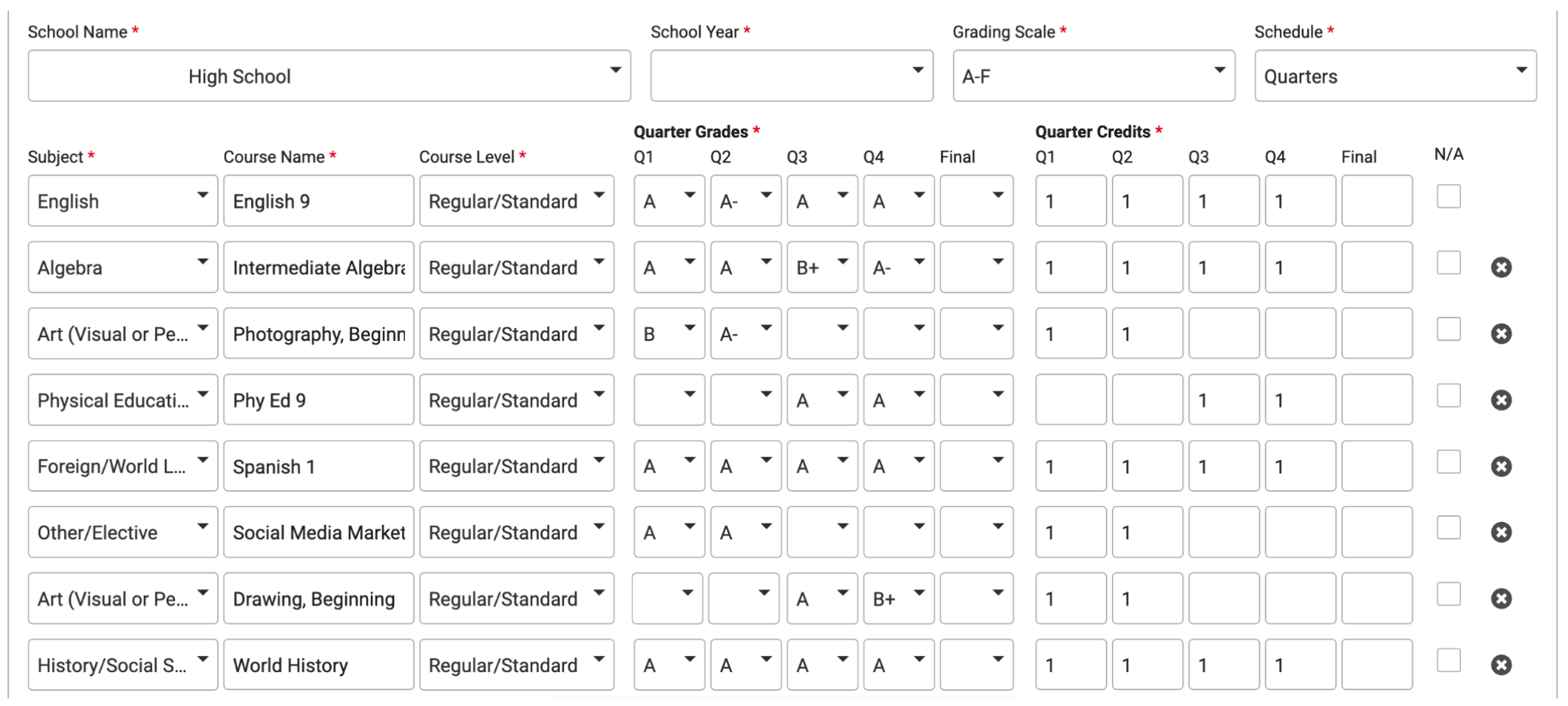
Quarterly grades
Transcript sample - 9th grade quarters

How quarters look in Common App
Leave the "final" grade dropdown blank if your school does not award final grades.
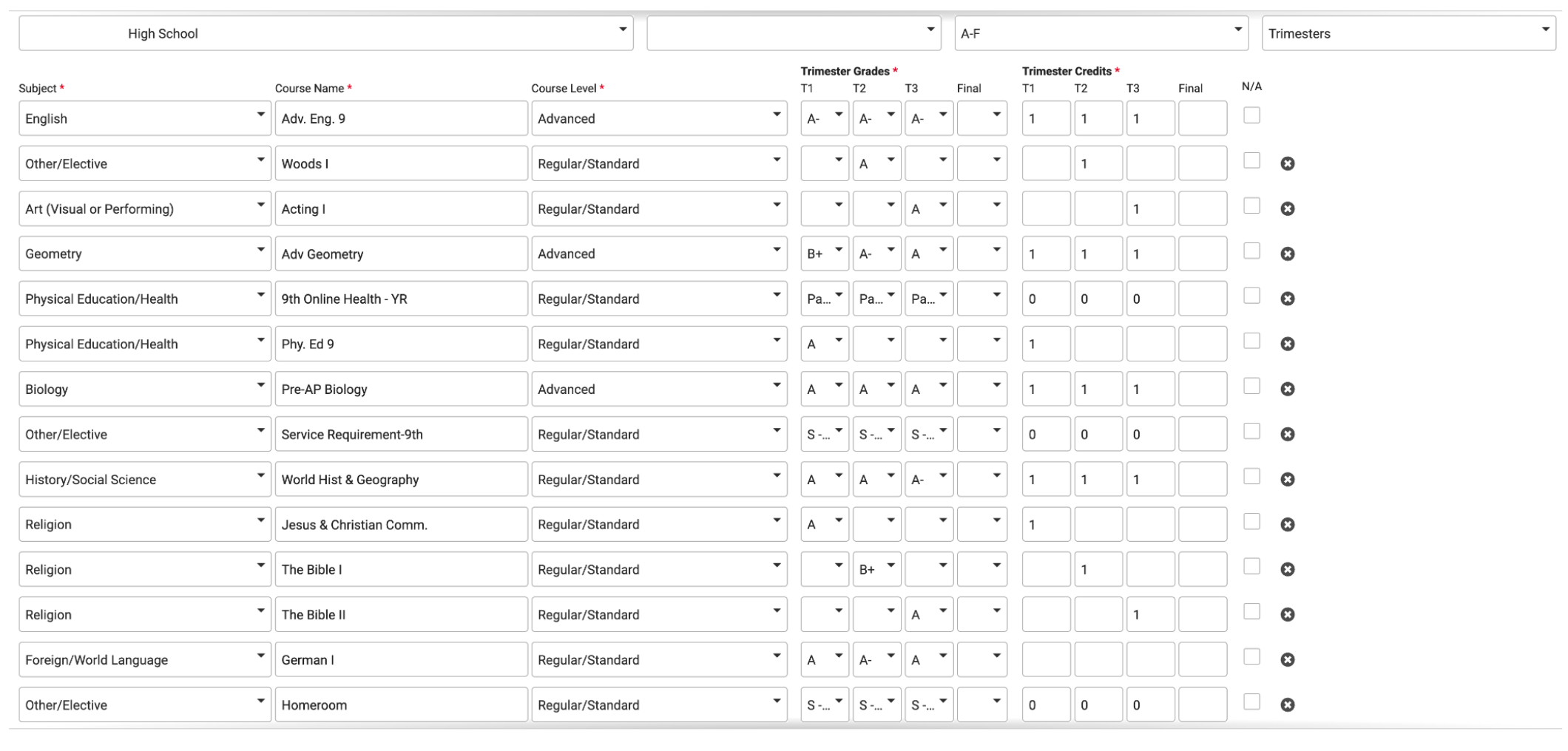
Trimester grades
Transcript sample - 9th grade trimesters

How trimesters look in Common App
Leave the "final" grade dropdown blank if your school does not award final grades.
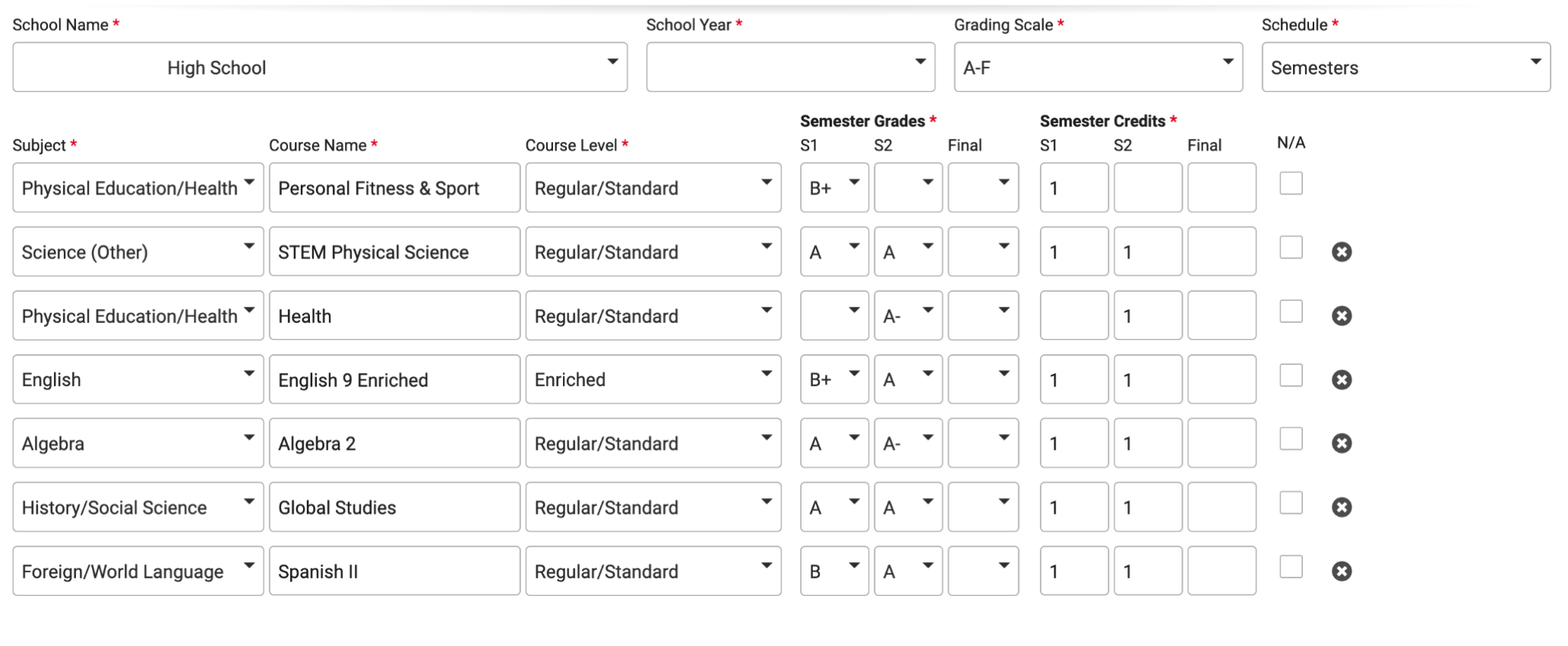
Semester grades
Transcript sample - 9th grade semesters

How semesters look in Common App
Leave the "final" grade dropdown blank if your school does not award final grades.
12th grade courses
Transcript example - Grade 12 courses in progress

How grade 12 in-progress courses look in Common App
In Common App, your grade 12 courses in progress (classes you don't have grades for yet) will NOT go into the Courses & Grades section. Instead, enter them into the Education section under "Current or Most Recent Year Courses."

Here's what the final entry would look like:

PSEO/College in the Schools courses
Transcript sample for PSEO and CIS courses

How PSEO and CIS courses look in Common App

Getting Started in Courses & Grades
FAQs
How do I access the Courses & Grades section of Common App?
Find the Courses & Grades section within the common questions of Common Application. NOTE: Click "Yes" to the statement "I am able to obtain a copy of my transcript." If you click "No," you will not be given access to the Courses & Grades section even though it is required for your University of Minnesota Common App.
What do I need in order to complete the Courses & Grades section?
To enter your courses and grades you will need:
- A computer (or other device) with internet connection
- A copy of your unofficial transcript listing courses and grades from 9th-11th grade as well your current or upcoming 12th grade course titles (Do not enter your courses or grades from memory!)
- You should not submit a transcript as part of your application. Any transcripts submitted will not be used as part of our application review process, nor count as part of a complete application.
- Your ACT, SAT, or other standardized test scores (if you are choosing to include an ACT/SAT test score in the review of your application.)
What should I keep in mind when I enter my courses and grades?
As you're completing the form, remember that...
- You must be accurate. Have a copy of your unofficial transcript in hand to ensure accuracy.
- You must be complete. Report all coursework—both completed and in progress.
- You must be honest. Do not weight grades or change any information as it appears on your transcript.
For full descriptions of these expectations, you can review our Verification of Self-Reported Academic Record Policy.
How much time will it take to enter my courses and grades?
We estimate that it will take 45-60 minutes to enter your courses and grades on the application. Allow for more time if you have attended multiple schools or colleges. The form allows you to save your work, so you don't have to complete the form in a single session.
Should I still submit my high school transcript, just in case?
No. You should not submit a transcript as part of your application to the University of Minnesota Twin Cities. Instead, you must self-report your courses, grades, and test scores as part of your freshman admission application. Any transcripts submitted will not be used as part of our application review process, nor count as part of a complete application.
Who do I contact if I need accessibility accommodations for entering my courses and grades?
If you need any assistance with entering your courses and grades into your application, we are happy to help. Submit a question here or call us at 612-625-2008 or 1-800-752-1000.
Where can I find other resources about Common App's Courses & Grades section?
How should I label my courses and grades?
FAQs
How should I choose Course Level?
Select the level that best matches the level names used by your school, even if it doesn't exactly match how your school describes course levels.
How should I choose Course Length or Schedule for a class I took all year?
If you took a course for a full year and your school DOES provide a final year grade:
- IN COMMON APP: Enter your quarter/trimester/semester grades in the appropriate dropdown menus, and enter your full year grade in the "Final" grade dropdown menu.
If you took a course for a full year and your school DOES NOT provide a final year grade:
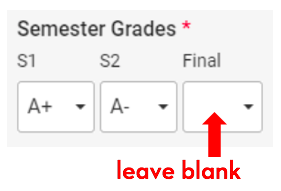
- IN COMMON APP: Enter your quarter/trimester/semester grades in the dropdown menus, and leave the "Final" grade dropdown menu blank.
For the Course Name, should I abbreviate course titles exactly as they appear on my transcript, or should I write the full words if I know them?
Please enter the names exactly as they are shown on your transcript. For example, if your transcript lists "EngLit/Com 10" you should type "EngLit/Com 10" rather than spelling out the words.
What if I took a course for only one semester/trimester/quarter?
Enter the course and the grade you received for the term (semester, trimester, or quarter). Leave the other term grades blank.
If the course length is not a semester, trimester or quarter, you can indicate a course length as "Other" on Common App and list the amount of credits you earned in the course.
My high school uses a letter grade system with AB grades, so the scale goes A, AB, B, BC, etc. How do I enter that?
Select "other" in the grading scale menu.
How do I report college courses taken through a PSEO (Post-Secondary Enrollment Option) program?
Enter these courses under your high school. When entering your courses, select "Dual Enrollment" for the Course Level.
How do I report college courses taken at my high school, such as College in the Schools?
Enter these courses under your high school and select "College Prep" for the Course Level in Common App.
How do I report my Project Lead the Way (PLTW) courses?
Enter the Project Lead the Way course title exactly as it appears on your high school transcript in the Course Name field. Enter the Course Level as Dual Enrollment.
What if I repeated or withdrew from one or more of my classes?
You must list all courses that you've attempted. If the course appears on your transcript (including repeated or withdrawn courses), it must accurately be listed when your self-report your courses and grades.
How do I list summer courses?
For courses taken during the summer, list the course and associated grade in the preceding school year. For example, if you took a summer course between 9th and 10th grade, you will list the course and grade in the final semester (or trimester or quarter) of your 9th grade year.
How closely does the or Subject need to match my course name?
Select the Subject that best matches your course name. If you are unsure, select Other.
How can I report accelerated coursework that I took in middle school that counted for high school credit?
Please report courses and grades that you took 9th-12th grade only on the Academic Record. When we review high school coursework, we consider the highest level of the subject achieved in high school. For example, if you took French 2 in 9th grade, we understand that you would have taken French 1 previously. We will know that you would have completed previous coursework in order to be at that level.
If I was homeschooled, should I self-report my courses and grades?
Yes, please complete the Courses & Grades section when you're applying on Common App.
Should I average my course grades on a semester/year basis?
No, do not average your courses. Enter your transcript information exactly as you see it on your transcript.
International Students entering Courses and Grades
How do International applicants report their coursework and grades?
You are required to report your 9th-12th grade courses and grades exactly as they appear on all of your original academic reports, transcripts and any external examination results, such as, but not limited to: IB, IGCSE, O/AS/A-level, HKDSE, SPM, CISCE/CBSE, and WAEC.
Students completing a South Korean curriculum do NOT submit their courses and test scores through the Self-Reported Academic Record form. (See question below about South Korea.)
- If your transcripts are not issued in English, certified, true line-by-line, literal English translations are required for filling out the self reported Academic Record Form.
- Do not adjust your grades in any manner. Do not weight grades. Do not average or convert them.
- If you are in your last year of secondary/high school, you will list your "in-progress" equivalent to US High School 12th grade courses for those that are not yet graded.
- You may submit your official transcripts online or via mail, but the Self-Reported Academic Record form will still be required.
EXAMPLE: If you went to school in China and now attend a U.S. high school, you need to report your Chinese school courses and grades with maximum grades (e.g. 30, 50, 70, 100, 120, 150- point grading scales) exactly as they appear on your original Chinese transcript issued by your Chinese school. Report your course names in English; however, you should not report your grades in the A-F grading scale if they appear on your U.S. high school transcripts.
If I am completing or have completed a South Korean curriculum, do I need to report my courses and grades on my application??
Do not complete the Courses & Grades section on Common App. However, you must submit a clear and legible scanned copy of the following via our Application Tracker (you'll gain access after you submit your Common App).
- 9th-12th grade academic reports, transcripts, and/or examination results (required);
- English proficiency test score reports (required); and
- ACT and/or SAT score reports (optional)
If you are a current high school senior and your transcript does not include your "in-progress" 12th grade coursework, please create a list of your 12th grade courses in a Word or PDF file format and submit along with your transcripts and English proficiency test score reports.
If my 9th grade year was taken in a middle school or junior high, should I add my middle school/junior high school to my "High Schools Attended" list?
If you attended school outside the United States, yes. Please list all of the schools that you attended for grades 9-12.
What if my numerical grades include decimal points?
Select Other under Grade Scale.
Do I need to submit an outside evaluation of my courses?
No. We do our own in-house evaluations of international coursework.
How do I report my external examination results?
Be sure to report all courses, subjects or classes with grades that you took at your secondary school for each year.
- Go to Enter Coursework tab
- Select the academic year when you took the exam in Enter Coursework section.
- Add information in Subject Area, Course/Exam Content, Course/Exam Name, and Proficiency Level.
Select External Exam under Course Length, and then add Grade/Score, Maximum/Highest Grade, and Exam Date.
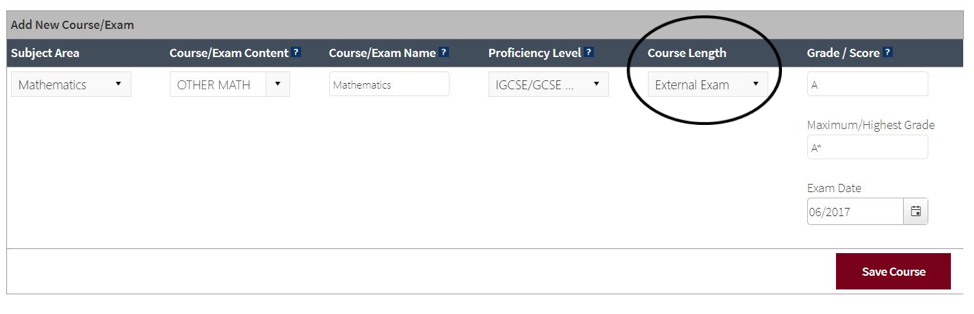
Instructional videos are also available to help you complete the Self-Reported Academic Record.
How do I report my English proficiency test scores?
Students should report their highest Total or Overall scores and associated Listening, Reading, Speaking and Writing subscores from the same test date and testing agency using the Self-Reported Academic Record form. However, students will be given the opportunity to list all of their tests taken. Do not "superscore" your tests.
If you send your official test scores to the University of Minnesota from the testing agency, we will use your official scores in our review of your application.
For more information, visit our English Proficiency Information page.
How do I report my ACT and/or SAT test scores?
ACT and/or SAT test scores are not required for international students, but are highly recommended. Students should report their:
- highest composite or total scores and
- associated Writing (ACT) and/or Writing & Language (SAT) scores from the same test date using the self reported Academic Record form.
- Students will be given the opportunity to list all of their tests taken. For more information, visit our ACT and SAT information for freshman admission page.
If you send your official test scores to the University of Minnesota from the testing agency, we will use your official scores in our review of your application.
As an international student, I took the United States GED. How do I report my high school courses?
Fill out the Self-Reported Academic Record with all years and courses you took in secondary school. GED schools must be sent to our office directly from the testing agency.
I submitted my Common App. How do I make changes to my courses and grades?
FAQs
I did NOT use the Courses & Grades section on Common App. How can I enter my courses and grades?
If you submitted your Common Application without providing Courses & Grades information, you will need to submit a Self-reported Transcript and Academic Record (STARS) to complete your application. Log into Application Tracker to access STARS. (Application Tracker is available to you within a few days after submitting your Common App.)
STARS offers an “Easy Import” tool that allows you to upload an unofficial transcript and the STARS platform will pre-populate your courses and grades based on that unofficial transcript. All you need to do is check that the computer imported your transcript data correctly and make any adjustments before you submit.
STARS is used by the University of Minnesota Twin Cities as well as many other colleges and universities, allowing applicants a seamless method for submitting and updating academic records to many schools.
How do I update my courses and grades after I submitted my Common App with Courses & Grades?
To update your courses and grades after you have already submitted your Common App with the Courses a& Grades section, go to your Application Tracker and click on the Self-reported Transcript and Academic Record (STARS) link in your checklist.
This link will bring you to the STARS platform. (Common App does not allow users to update courses after submitting the application, so the STARS platform is how we give you the opportunity to make updates.)
Once I receive my senior year grades, should I update my self-reported courses and grades?
If you received a defer or waitlist decision:
We encourage you to report your senior year grades by going to your Application Tracker and clicking on the Self-reported Transcript and Academic Record item on your checklist. Your senior year grades will give us additional information about your individual academic progress to review as we make an admission decision.
If you received an admit decision:
You do not need to send us updates on your senior grades in the winter or spring. If you choose to confirm your enrollment to the U of M, you will send your final transcript by July 1 after your senior year. We will review it to verify your academic performance.
However, if your senior year grades decline significantly and you are concerned about your academic progress, you must consult with an admissions counselor at 612-625-2008 or 1-800-752-1000. Unsuccessful completion of senior year coursework and/or a significant decline in academic performance during the senior year may result in the cancellation of admission.
What if my senior year courses have changed after submitting my application?
Changes in senior year coursework may result in a change to the student's college of admission. If you are considering making changes to your senior year courses or if you are concerned about your academic progress in any of your courses, you must consult with your admissions counselor right away at 612-625-2008 or 1-800-752-1000. You can also submit a question online.
How will my courses and grades be reviewed?
Your self-reported courses and grades—as well as your application form—will go through an individual holistic review by our admissions team (no automatic formulas are used). Each University of Minnesota Twin Cities admission application is carefully reviewed and admission is based on an overall assessment of the applicant's academic and context factors. A complete list of these factors is included below.
What happens if I made a mistake or typo?
If you notice a typo in your courses and grades after you've submitted your Common App, you can use our STARS platform (Self-reported Transcript and Academic Record System) to update your courses and grades.
To access this platform, visit your Application Tracker and click on the Self-reported Transcript and Academic Record (STARS) item in your checklist.
How will you verify that my grades and scores are correct?
If you are admitted to the University of Minnesota Twin Cities and confirm your enrollment, you must submit by July 1:
- an official final high school transcript that lists your graduation date, and
- official ACT/SAT scores (only if you chose to have an ACT/SAT score considered in the review of your application) and official English proficiency scores (if applicable) from the testing agency
We will compare your official transcript and test scores against your Self-reported Transcript and Academic Record (STARS).
If we find any discrepancies, we will follow our Verification of Self-Reported Transcript and Academic Record Policy. The University of Minnesota has the right to cancel enrollment for any students who misrepresented their academic record.